

Copilot SafeScan: Is Your Microsoft 365 Tenant Ready for Copilot?


Microsoft 365 Copilot surfaces every file your users can already access. That is its strength, and its risk: one folder shared with Everyone years ago can put board-level data in front of the whole organisation the day you switch Copilot on. Copilot SafeScan is the LogiSam product that shows you what Copilot will be able to see before you enable it, gives you a Copilot Readiness Score, and hands you the fix for every finding, down to a ready-to-run PowerShell script.
No agents to install · Read-only permissions · Results in under 5 minutes
The problem: Copilot inherits every permission
- Oversharing becomes discoverable. Once Copilot is enabled, it can read any file a user can access, including documents shared too broadly years ago.
- Identity and compliance gaps add up. Users without MFA, guests nobody has reviewed, app secrets close to expiry and gaps across Entra ID, Purview and Teams.
- Most tools only report, never guide. A long list of findings with no priority order tells you what is wrong, not what to fix first or how to fix it. Your admin loses hours untangling the noise.
The solution: scan, score, remediate
SafeScan maps your full SharePoint permission landscape, scores your tenant with a Copilot Readiness Score (0–100), and generates step-by-step remediation and a ready-to-run PowerShell script for each finding. Fix the right things, in the right order, in minutes.
23 automated checks · 6 domains · under 5 minutes to scan · free tier to start
Key features
Security checkpoints
23 automated checks across six domains: Exposure, Identity, Compliance, Teams, Licensing and Copilot. Every check shows pass, warning or fail with a score, rolled up into domain scores and your overall readiness.

Risk findings
Every flagged item ranked by severity, with the exact SharePoint path, audience type (Internal, Anonymous, External, Broken Inheritance), sensitive data hits (Financial, Legal, HR), a recommended action and resolution tracking.

Remediation steps
Numbered admin centre instructions for every failing or warning check, linked to the relevant Microsoft documentation, across SharePoint, Entra ID, Purview, Teams and the Microsoft 365 admin centre.

PowerShell scripts
A ready-to-run PowerShell 5.1 / 7+ script for every failing check, tailored to your tenant. Copy, run, rescan to confirm. Scripts include comments and output logging, so they are audit-ready.
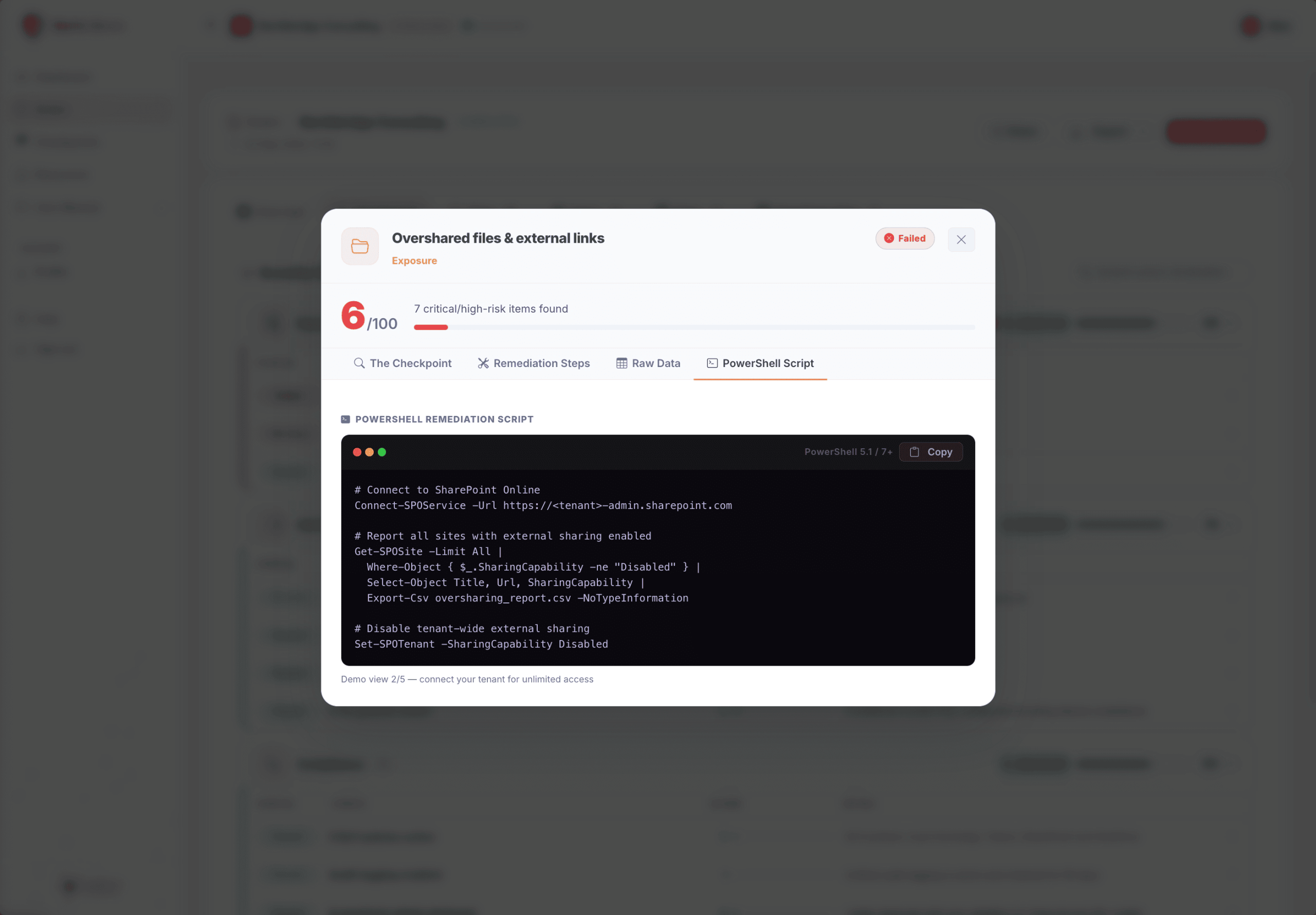
Users and app inventory
Every user with MFA status, department, account status and last sign-in, filterable by Needs Attention, Disabled or Guests. Every app registration with secret expiry, permission count and risk flags, plus Expiring Soon alerts so you never miss a renewal.

Read-only, privacy first
SafeScan requests only read-only Microsoft Graph permissions and can never create, edit or delete anything in your tenant. It reads metadata and permissions, not the content of your files, emails or Teams messages: it sees who has access to what, never what the file contains. You can revoke access from Microsoft Entra ID at any time, and no data is retained after you disconnect.
Who Copilot SafeScan is for
- IT and security teams preparing a Microsoft 365 Copilot rollout who need to close oversharing gaps first.
- CIOs and CTOs who want a single readiness score to report to the board and track over time.
- Microsoft partners and MSPs running Copilot readiness assessments for clients.
Copilot SafeScan is also available on the Microsoft Marketplace and Azure Marketplace, billed through your existing Microsoft agreement.
Find out what Copilot will see before your users do
Run a free scan in under five minutes. Read-only, nothing to install, and every finding comes with its fix.


